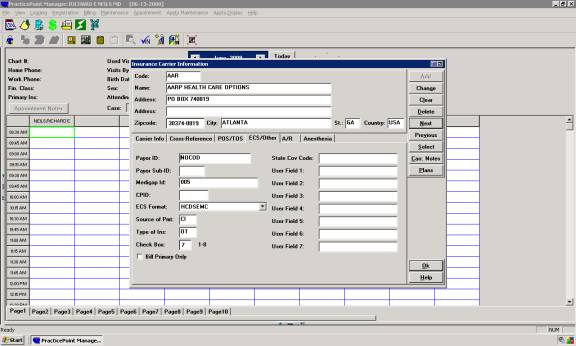
When adding a new Insurance Carrier
- Be sure NOT to put erroneous characters in your address lines (i.e. no �#� �~� �$� �%� �^�) these will cause rejections in electronic claims.
- Be sure to fill in �Carrier Type� with the appropriate selection.
- Release of Information must be �Y�.
- (7.0 Clients Only) Co-Insurance Remark should be �PR2�.
- The only valid ID qualifiers are:
����������� 1C = Medicare Part B (Railroad Medicare, DME Included)
����������� 1B = Blue Cross Blue Shield (Compcare)
����������� 1D = Medicaid
����������� G2 = All other ID�s
����������� 1G = Provider UPIN number (referrals only)
If you have setup other ID qualifiers for your providers, you may experience rejects from the payor since they have not implemented specific qualifiers based on our software.
- *On the �ECS/Other� tab, Fill in �Payor ID� with NOCOD if this carrier is NOT going electronically.� If this carrier is going electronically, fill in the proper Payor ID from the Payor ID List.
- *Fill in �Source of Payment���
BL= Blue Cross Blue Shield
MB= Medicare, Railroad and DME
MC= Medicaid
CI= All other carriers
- *Fill in �Type of Insurance�
MB=Medicare, Railroad and DME
MC=Medicaid
OT=All other carriers
*Fill these in regardless of whether this carrier is going electronically or on paper.